The writing app that pays attention.
Attente reads alongside you and remembers your whole book: every name, date, promise and thread. In the margin, a reader notices what a good editor would, and shows you why, so you can stay with the sentence in front of you.

Why it's called Attente
“Attention is the rarest and purest form of generosity.”
Attente is French for waiting: not the idle kind, but the patient, open attention Simone Weil wrote about in Attente de Dieu. To attend to something, she said, is to put yourself aside and look at it fully.
That is what a good reader gives a manuscript, and it is what we wanted software to give a writer: close attention to the work, and the wisdom to leave the writing to you.
A reader who knows your whole book.
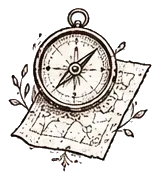
Beside the page sit readers who work the way a trusted first reader does: closely, quietly, and on your terms. Every suggestion is yours to take.

It notices
A name that changed, a timeline that slipped, a line that sags, a promise the book hasn't kept.
It suggests
Each note sits beside the words it's about, with its reason. Edits are shown as tracked changes.
You decide
Your manuscript changes only when you accept. Dismiss anything; switch any reader off.
Everything a book needs, and a way to put it all away.
The binder, the views, the story bible and the readers in the margin are all within reach. When it's time to write, one key puts them away.
Only the page, and the sentence you're writing.
Attention mode in Attente. Everything else steps back until you need it. Nothing moves unless you make it: no pop-ups, no badges, no “Saving…”.

Built around how writers work.
Plan, write, revise, publish. Attente has the structure of the apps you know, with a reader in the margin at every stage.
Plan
Find the shape of the thing before, during and after you write it. Every view is the same manuscript, seen another way.
- The binderChapters, scenes, notes and research in one tree, in your order.
- Corkboard and outlineIndex cards with synopses, or a table with point of view, status and words.
- Story bibleCharacters, places and things, kept up to date as you write, each new fact waiting for your yes.


Write
A page, and nothing else, until you ask. Nothing on the screen moves unless you make it.
- Attention modeOnly the page and the paragraph you're in. Everything else waits.
- Typing soundsA typewriter, a soft mechanical keyboard or felt, quiet and never in the way. Off until you choose one.
- Spelling and grammar on the deviceChecked on your computer, in English and French. Nothing is sent.


Revise
The readers in the margin do their best work here: they notice, they explain, and you decide.
- ContinuityNames, eye colours, dates and ages that contradict each other, with both places shown.
- Line editTightening and rhythm, as tracked changes with a reason for each.
- Beta readersA literary reader, a genre fan and a sceptical editor react to finished chapters.


Publish
From the last full stop to the submission inbox, with your words in files you own.
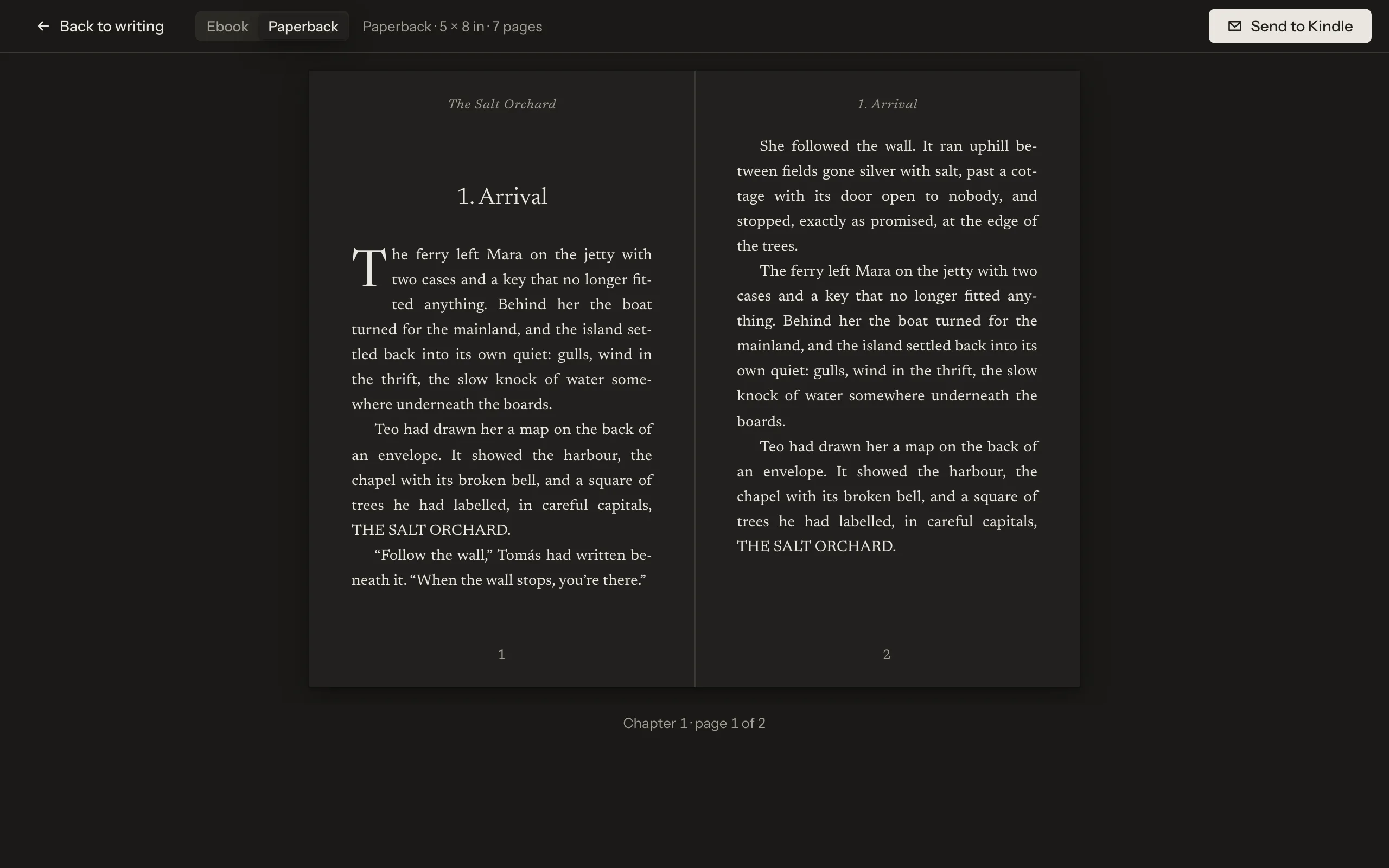
- Typeset paperback and EPUBA book you can turn the pages of, and an ebook checked for the stores.
- Submission manuscriptStandard manuscript format, checked, with the fixes you choose.
- Plain text, alwaysEvery project out as plain text or Markdown, with no account and no plan.
Your words stay yours.
![]()
Local-first
Your manuscript lives on your computer, as real files in a folder you can see. Everything works offline, and plain-text export is always there.
![]()
Never trained on your writing
Your words are never used to train a model, ours or anyone's. Hosted readings are forgotten when the request ends.
![]()
Real off switches
The readers are on when you start. One switch turns them off for the app, one for a project, one for each reader. Off means nothing is sent.
![]()
Calm by design
Nothing moves unless you act. Notes wait behind a quiet count in the margin, never a pop-up, and nothing changes until you accept.




Novels, stories, screenplays, theses and games.
Each form gets a page that behaves like it should, and the same readers, binder and promises.
![]()
Novels
Chapters and scenes, a story bible and the readers in the margin.
![]()
Short stories
A collection in one project, each story its own document, and a tracker for where you sent them.
![]()
Screenplays
Industry format as you type, Fountain in and out, scene by scene.
![]()
Theses
Numbered headings, citations and a bibliography that keeps up.
![]()
Games
Branching scripts in Ink, seen as a graph, played through, and exported as .ink.






Coming from Scrivener or Ulysses?
Bring your projects with you. Attente imports Scrivener projects, Ulysses exports, Word, Markdown and Fountain, and never changes the originals.
Try Attente free for 7 days.
Download it for macOS, Windows or Linux, or open it in your browser. When it's earned its place, one licence covers every computer you write on.